Managing multiple monitors, external drives, keyboards, and network connections can quickly turn a professional workspace into a mess of cables and adapters. The Targus USB-C Universal Quad 4K (QV4K) Docking Station with 100W Power Delivery aims to simplify that setup by connecting several displays and essential peripherals through a single laptop connection.
What makes this docking station stand out is its support for up to four external 4K displays, combined with laptop charging, wired networking, and multiple USB ports. This configuration is particularly appealing to financial professionals, analysts, office workers, and anyone who needs several applications visible simultaneously.
Unlike many modern Thunderbolt docks, the Targus DOCK570USZ uses USB-C connectivity with DisplayLink technology. That distinction matters because it offers extensive display connectivity without requiring every screen to rely on the laptop's native display outputs. However, it also introduces software requirements and potential compatibility considerations.
The important question is whether its four-monitor capability, 100W power delivery, and broad connectivity justify choosing it over newer docking stations. This review examines its specifications, practical benefits, limitations, customer feedback, and competing alternatives to help you decide.


Best Overall
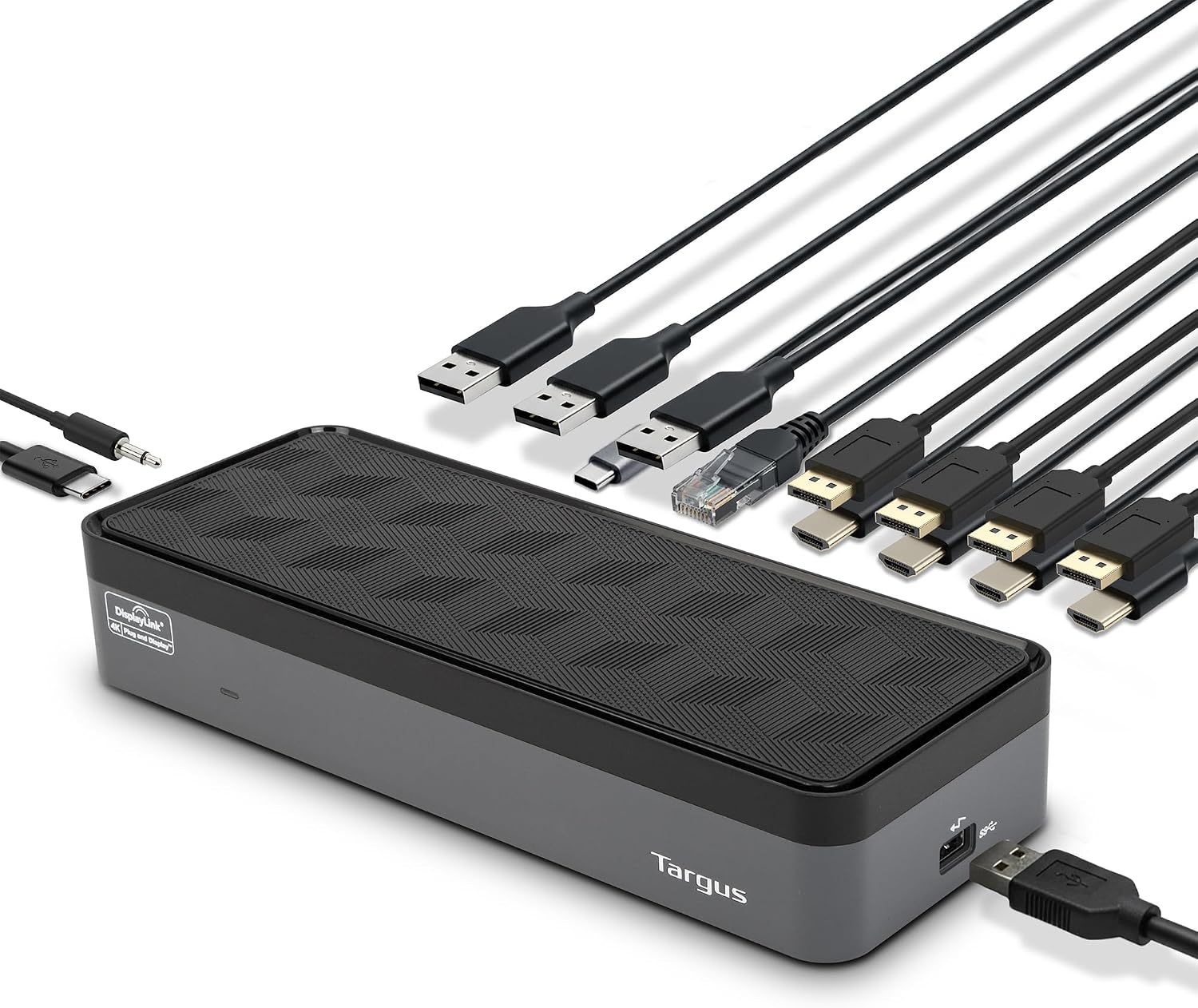
Targus USB-C Universal Quad 4K (QV4K) Docking Station with 100W Power Delivery
For users who genuinely need four external displays, this Targus docking station is a compelling option. Its combination of four HDMI outputs, four DisplayPort outputs, USB connectivity, Gigabit Ethernet, and laptop charging makes it particularly suitable for complex office installations.
Its greatest advantage is flexibility rather than cutting-edge speed. Although the connection is not Thunderbolt 4, the DisplayLink-based design allows compatible computers to support multiple extended displays through one dock. The three-year limited warranty also adds reassurance for business users.
Key Features
Four External 4K Displays
The standout feature is support for up to four external 4K monitors. The dock provides four HDMI outputs and four DisplayPort outputs, allowing compatible configurations to use either interface or a combination of the two.
Targus specifies DisplayPort resolutions up to 3840 × 2160 at 60Hz and HDMI resolutions up to 3840 × 2160 at 50Hz. A compatible setup can also support a single 5K display.
This arrangement benefits spreadsheet-heavy workflows, financial dashboards, data analysis, research, and video monitoring. Nevertheless, users should confirm their operating system, graphics configuration, and driver support before expecting four independent displays to work exactly as planned.
100W Power Delivery
The docking station supplies up to 100W of power to compatible USB-C laptops. This can reduce desktop clutter by combining connectivity and charging through one cable.
For compatible legacy laptops that use barrel-style charging connections, Targus includes power tips supporting charging up to 90W. Buyers should verify their laptop's charging requirements and connector compatibility rather than assume every model can use the same power arrangement.
Essential Ports for a Complete Workspace
Beyond video connectivity, the dock includes four USB-A ports, one USB-C peripheral port, Gigabit Ethernet, and a 3.5mm combination audio jack. One USB-A port supports fast charging.
These connections accommodate keyboards, mice, external storage, wired internet, and headsets without requiring several separate adapters.
The integrated security lock slot is another practical inclusion for shared offices and managed workplace environments.
Universal Compatibility and Practical Design
The Targus DOCK570USZ supports compatible USB-C systems, including Thunderbolt 3 hosts, and is designed for use across multiple computer platforms. However, it is not itself a Thunderbolt 4 dock.
DisplayLink technology powers its multi-monitor functionality, so the appropriate software and operating-system permissions may be necessary. Its relatively compact enclosure, padded bottom, and optional VESA mounting compatibility make it suitable for permanent desk installations.
Real Customer Feedback
The Amazon product page displayed a rating of 4.4 out of 5 stars when checked. A reliable live review count could not be extracted from that page, although a third-party snapshot reported approximately 749 ratings. That count should be treated as approximate because publicly available listing mirrors differ.
Public retailer feedback provides additional context. Positive comments describe the dock working as expected and supporting demanding multi-monitor arrangements. One reviewer reported using three 32-inch monitors alongside a 43-inch display successfully.
Reported concerns include a host USB-C cable that some users consider too short and occasional compatibility or connection difficulties with particular laptops. These reports suggest that the dock's capabilities are attractive, but individual computer compatibility deserves careful checking before purchase.
Pros and Cons
Pros
Supports up to four external 4K displays.
Offers both HDMI and DisplayPort outputs.
Provides up to 100W laptop charging.
Includes USB-A, USB-C, Gigabit Ethernet, and audio connectivity.
Includes legacy laptop charging tips and a USB-C-to-USB-A adapter.
Backed by a three-year limited warranty.
Cons
Uses a 5Gbps USB connection rather than Thunderbolt 4 bandwidth.
Requires DisplayLink software for its multi-display functionality.
HDMI output specifications are limited to 4K at 50Hz.
Four-monitor operation depends on computer and operating-system compatibility.
May be excessive for buyers who only need one or two external screens.
Who Should Buy This Product?
The Targus USB-C Universal Quad 4K Docking Station is best suited to professionals who need more screen space than conventional laptop docks provide.
Financial analysts, office administrators, researchers, and corporate employees working with several applications simultaneously are likely to benefit most. It can also suit managed workstations where multiple peripherals must connect through one central docking point.
It is less appealing for gamers, users prioritizing high-bandwidth external storage, or anyone who wants Thunderbolt 4 performance. People with simple single-monitor setups may find a smaller, less expensive USB-C hub more practical.
Installation and Setup Overview
Setting up the dock is straightforward, although multi-monitor operation requires a little preparation.
Check compatibility: Confirm that your laptop supports the required USB-C display connection and that your operating system supports the intended DisplayLink configuration.
Connect power: Attach the supplied power adapter and select the appropriate charging arrangement for your computer.
Install the software: Install the compatible DisplayLink software and follow any operating-system permission instructions.
Connect the displays: Attach your monitors through HDMI, DisplayPort, or a supported combination of both.
Connect peripherals: Add your keyboard, mouse, network cable, storage devices, and audio equipment.
Configure the displays: Open your operating system's display settings to arrange monitors, select extended-desktop mode, and adjust supported resolutions and refresh rates.
If a screen remains blank, check the cable, input selection, drivers, and laptop compatibility before assuming the dock is defective.
Comparison with Similar Products
Three alternatives worth considering are the Dell WD22TB4, Plugable UD-6950PDZ, and CalDigit TS4.
| Feature | Targus DOCK570USZ | Dell WD22TB4 | Plugable UD-6950PDZ | CalDigit TS4 |
|---|---|---|---|---|
| Connection | USB-C, DisplayLink | Thunderbolt 4 | USB-C, DisplayLink | Thunderbolt 4 |
| Display support | Up to 4 × 4K | Up to 4 displays, configuration dependent | Up to 3 displays | Typically dual displays |
| Laptop power | Up to 100W | 130W Dell / 90W non-Dell | Up to 100W on updated version | Up to 98W |
| Ethernet | Gigabit | Gigabit | Gigabit | 2.5GbE |
| Best use | Four-screen office | Dell-centered offices | Three-screen office | High-bandwidth workstation |
Dell WD22TB4
The Dell WD22TB4 offers Thunderbolt 4 connectivity and up to 130W charging for compatible Dell systems, dropping to 90W for non-Dell laptops. It is a strong choice for Dell-focused offices that value Thunderbolt connectivity and enterprise integration. However, its monitor resolutions depend on the host and display configuration.
Plugable UD-6950PDZ
The Plugable UD-6950PDZ is another DisplayLink-based solution, supporting up to three external displays. Its updated version supports up to 100W laptop charging, although older units with the same model number may offer only 60W. It makes sense for users who need three displays rather than four.
CalDigit TS4
The CalDigit TS4 emphasizes high-bandwidth connectivity, offering 18 ports, Thunderbolt 4, 2.5Gb Ethernet, and up to 98W laptop charging. It is better suited to users who prioritize fast peripherals and premium workstation connectivity over four-monitor output.
Overall, the Targus is particularly attractive when four external displays are the primary requirement. The alternatives make more sense when Thunderbolt bandwidth, newer connectivity, or a different number of monitors matters more.
Final Verdict
The Targus USB-C Universal Quad 4K (QV4K) Docking Station with 100W Power Delivery remains a capable specialist docking station in 2026. Its combination of four-display support, laptop charging, useful peripheral ports, and legacy charging accessories can simplify demanding office setups.
Its biggest strength is the ability to support up to four 4K displays through a single host connection. Its main weakness is the older 5Gbps USB interface, alongside the software and compatibility considerations associated with DisplayLink.
Is it worth buying? Yes, particularly for professionals who genuinely need four external screens and whose computers are compatible. For simpler setups or users seeking Thunderbolt 4 speeds, newer alternatives may provide better value.
Editorial Rating: 4.3/5
Where to Buy
You can check current availability, pricing, and customer feedback for the Targus USB-C Universal Quad 4K (QV4K) Docking Station with 100W Power Delivery on Amazon.
Buy the Targus DOCK570USZ on Amazon
Frequently Asked Questions
1. Does the Targus DOCK570USZ support four monitors?
Yes. It supports up to four external 4K displays through its HDMI and DisplayPort outputs, subject to compatible hardware, software, and operating-system requirements.
2. Does this docking station charge a laptop?
Yes. It delivers up to 100W through its supported laptop charging connection. Compatible legacy laptops can use the included power tips for charging up to 90W.
3. Is the Targus DOCK570USZ a Thunderbolt 4 dock?
No. It uses USB-C connectivity and DisplayLink technology, although it is compatible with suitable Thunderbolt 3 hosts. It does not offer Thunderbolt 4's 40Gbps connection bandwidth.
4. Is it compatible with MacBooks?
Compatibility depends on the specific MacBook, its processor, and the operating system. DisplayLink software and permissions may be required, so check the supported configuration before purchasing, especially if you need four independent external displays.
5. Is the Targus DOCK570USZ worth buying in 2026?
It is worth considering if you need four external monitors, 100W laptop charging, and extensive office connectivity. A Thunderbolt 4 dock is usually a better fit for users prioritizing higher bandwidth and modern workstation expansion.
Meta Description
Targus USB-C Universal Quad 4K Docking Station review: explore four-monitor support, 100W charging, compatibility, key drawbacks, and buying advice.
